- engineering
- mcp
How we built interactive views with MCP Apps
How TasKadence's interactive views are built on MCP Apps, the open standard: data carried inline, a bridge that replays late messages, a stop button we respect, and about 20 KB per view.

Rithin Gullapalli
Product Architect, Indrasol
· 7 min read
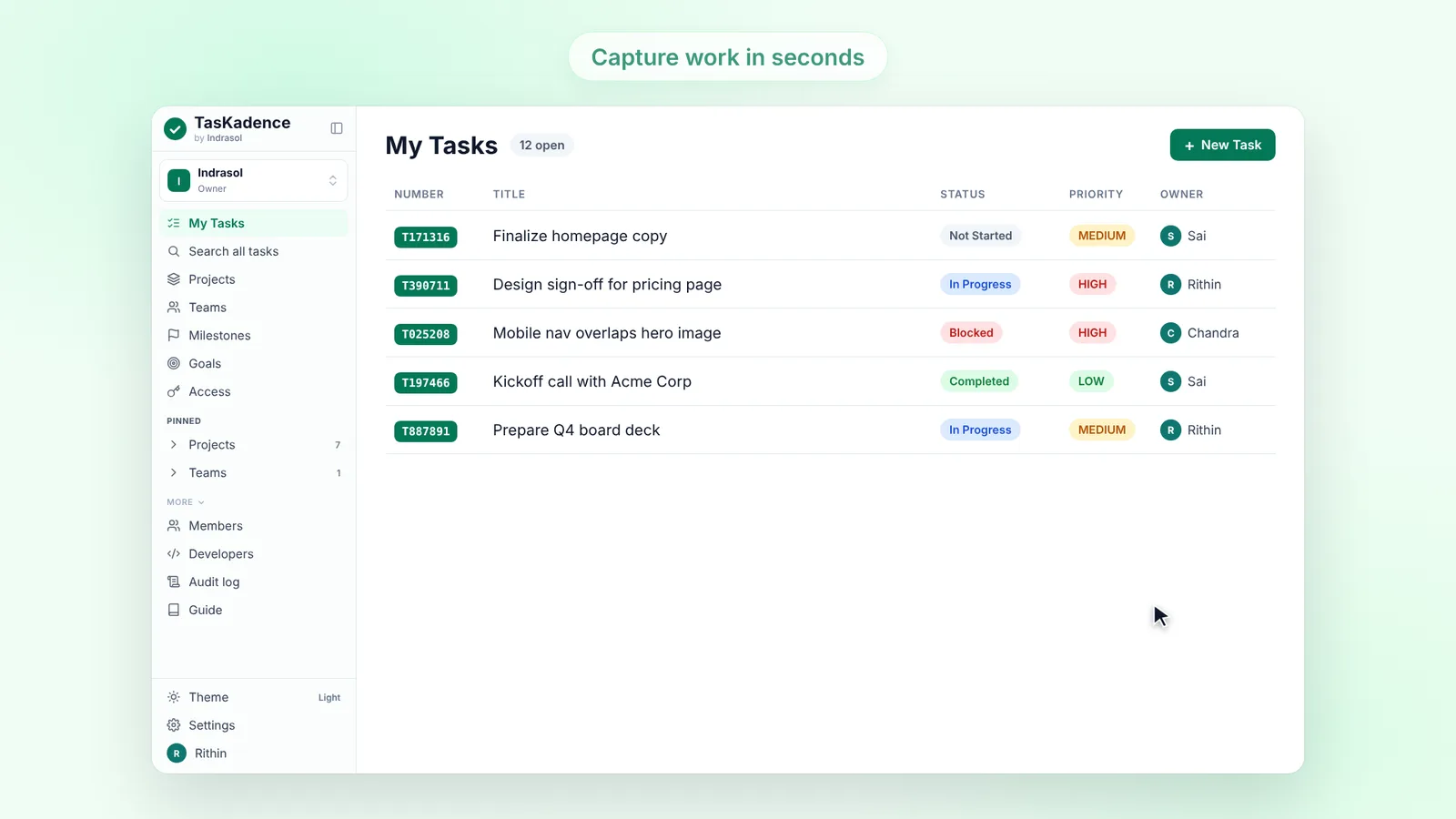
TasKadence's MCP server can answer with small interactive views next to its text: a task list you can act on, a sprint with a burndown, a Planning board with each person's open work and each project's sprints as lanes. They first shipped in Claude, and they are built on MCP Apps, the open extension of the Model Context Protocol, not on anything one host owns. This post is about that design: what the standard asks of a view, the rules we added, and the bugs that shaped them.
The MCP Apps model
A view is an MCP resource. A tool names it in its metadata (_meta.ui.resourceUri, a ui://taskadence/<view>?v=<build> address), and the resource is one HTML document served with the MIME type text/html;profile=mcp-app. When a host that supports MCP Apps calls the tool, it reads that resource and loads it into a sandboxed iframe. The ?v= part is a hash of the view sources, so a host that caches by address picks up a new release.
Everything after that is JSON-RPC over postMessage, on a small set of ui/* methods:
ui/initialize: the view says who it is and which protocol version it speaks; the host answers with its own name (hostInfo), the theme and its capabilities.ui/notifications/tool-inputandui/notifications/tool-result: the arguments of the call, then its result.ui/notifications/tool-cancelled: the person stopped the request.tools/call: the view calls a TasKadence tool, through the host, on the same connection and with the same permissions. Changing a status is anupdate_taskcall.ui/notifications/size-changed,ui/open-linkandui/messagefor the frame's height, links out, and a follow-up question.
Every result keeps its plain text as well. A host without MCP Apps, or a terminal client, gets the same answer it always did.
Data inline, no network
The standard lets a view ask the host for network access through a content security policy in the resource's metadata. Ours asks for nothing: connectDomains and resourceDomains are both empty, so the view runs under the host's default policy, which has no network at all.
That is a choice, not a limitation. All data a view shows arrives inside the tool result (structuredContent, with a little view metadata in _meta), and every change goes back as a tool call through the host. So:
- No token in the view. The HTML is the same file for every person. It never authenticates, so it has nothing to leak.
- One permission model. A view can do exactly what the connection's scopes allow, because it only ever calls the same tools the model calls.
- Nothing to break in a strict sandbox. Each view is built with Vite, TypeScript and Preact into one self-contained HTML file, JavaScript and CSS inline. A test scans the built files for
fetch,eval,new Function, external loads and token prefixes.
One sandbox lesson came free: in a frame that allows scripts but not forms, a <form> submission is dropped before its submit event fires. Our first owner, due date and reply forms silently did nothing. They are buttons now, and a test fails on any <form>.
The late-subscriber race
Our first version could get stuck on its grey loading skeleton. We first blamed the host for not re-delivering a result to a remounted frame and added a fallback: after 4 seconds without a result, a read-only tool was called again with its original input. It didn't fix the problem. In a fresh chat, one question made the model call list_my_tasks twice; the second card rendered and the first stayed on the skeleton.
The cause was in our code. The hook that connected a view to the bridge read the bridge's state during the first render, but subscribed in an effect, which Preact runs after paint. A result that landed in between was never heard, and it had already switched off the stall timer, so the fallback never fired either.
The fix is a rule for the whole bridge: every message can arrive early, late, twice or never.
- The message listener is attached when the page loads, before the handshake, so nothing the host sends early is missed.
- The last
tool-input,tool-resultandtool-cancelledare kept, and anything that subscribes later gets them replayed at once. - No view shows a skeleton for more than 8 seconds. Every request has a timeout: 8 seconds for the handshake and reads, 60 seconds for writes. After that the view offers Reload, never an endless skeleton.
- Fake hosts that answer early, never answer, send odd results or remount run against all eleven views.
Respecting cancel
When the person stops the assistant mid-answer, the host sends tool-cancelled. Our early views ignored it, so a cancelled request looked like a slow one and could even be fetched again.
Cancellation is now its own phase. Before a result, it switches off the stall timer, an in-flight re-fetch no longer counts, and nothing is retried on its own. A result that still arrives afterwards wins; a cancel after a result leaves the result on screen. The words depend on the tool, because the honest answer differs: a read says "Nothing was changed", and a write says "It may have gone through - check TasKadence before trying again", since we can't know whether the server finished before the stop.
About 20 KB a view
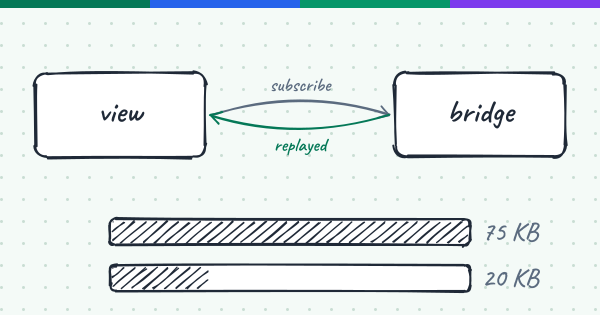
The first views used the official MCP Apps client library. About 60 KB of every view, gzipped, was that library with the MCP client and the schema validation it pulled in, for a view that needs a dozen messages. Preact and the view itself were around 10 KB.
So we wrote the view's side of the protocol by hand: JSON-RPC over postMessage, the replay above, ping and resource teardown answered, a timeout on every request, and height reports whenever the page resizes, the DOM changes or a floating menu opens. It imports the library's types only, which vanish at build time, and a test drives it with the SDK's real host-side AppBridge, so protocol drift fails a test, not a session.
The build measures every view the way it ships: it gzips the built HTML at level 9, writes the raw and gzipped bytes into the manifest next to the files, and fails above 150 KB raw or 40 KB gzipped. The eleven views went from about 75 KB each to between 20 and 27 KB gzipped, the richer ones (charts, burndowns, dependency graphs) at the top of that range.
One card per question
A model often makes a lookup to answer a different question: it finds the project before listing its sprint. Each of those calls used to draw a full card. Now every tool with a view takes display: "compact", and the view draws one line of about 40 px instead (its icon, its title, the server's one-line summary and a Show button that expands the card in place). The view knows it is compact from the tool input, before the result comes, so the host never reserves a card's height for it. An error, or a question the person has to answer, is always the full card.
Neutral by default
A view has to say things like "stopped this request" or "Couldn't connect to ...", and it should never name a host it may not be running in. So there is one place a view names the app it runs in: the hostInfo.name from the ui/initialize answer, cleaned to one short line and used as given. With no usable name (an older host, a test, a handshake that has not finished) the copy says "the assistant". The same rule covers every label and empty state.
How we test the views
- Unit tests (Vitest) render each view against a fake bridge: phases, the replay, cancel, compact lines, the host's name or the neutral word, and every view's empty and error states.
- Protocol tests drive the hand-written bridge with the SDK's own
AppBridgeandPostMessageTransport. - A mock host loads the built files, the bytes the server serves, in an iframe with only
allow-scripts, answers tool calls from fixtures (or never, to catch stalls), and a headless Chromium screenshots each view light and dark. That harness is what caught the form bug. - CI rebuilds the views and fails when the committed files differ from the sources.
What we'd tell someone starting out
- Design the state machine for late, early, duplicate and missing messages first, and replay state to anyone who subscribes late.
- Carry the data in the result. A view with no network and no token has very little that can go wrong.
- Test in a sandbox as strict as the spec's example, against the built files, not the dev server.
- Measure the bundle in the build. A budget that fails the build is the only one that holds.